Thursday, January 6, 2022

Saturday, December 25, 2021
Fukushima Daiichi Nuclear reactor accident

Nuclear energy is one of the cleanest forms of energy and a blessing for humankind if handled well. But it poses a great threat to the environment and humankind. It makes use of Radioactive metals such as uranium which undergo nuclear fission releasing tremendous amounts of energy in the form of gamma radiations and alpha and beta particles. This radiated heat is used to produce steam which run turbines. If this radiation and radioactive materials leak, they can cause huge loss of life and property and the adverse effects of exposure to radiation are seen in humans in the form of cancer for many years and are carried to the next several generations.
Nuclear reactor accidents are of two types:
- Design basis accidents(DBA): These are the events which are considered while designing nuclear plants and it's made sure no major damage occurs during such events. Loss of coolant accident or LOCA is one such example.
- Beyond design basis accidents: These are caused by unforeseen extreme conditions and probability of core damage and leakage of radioactivity are high.[1]
Heat transfer and mass transfer play a major role in such accidents. Forced and convective heat transfer, metal water reaction, nuclear heat generation, melting, condensation, combustion, detonation, etc. play a major role in such accidents.[1]
Japan was hit by a major earthquake following which a 15-meter high Tsunami flooded a nuclear plant with water causing power outage leading to one of the major nuclear reactor accidents in history which began on March 11, 2011 and lasted for two weeks before a cold shutdown of the plant was announced.

It was level 7 accident according to the International Nuclear and Radiological scale.
Reactors 1, 2, 3 of total 6 reactors of Fukushima Daiichi were active at the time. Reactors 1, 2, 3 were automatically shutdown when the earthquakes hit. The reactors were resistant to the earthquake but couldn't stand the tsunami. The cooling systems for residual heat removal from the cores were running on backup generators. Within a few hours, 12 out of 13 backup generators keeping the RHR systems were disabled due to the flooding by the 15 meter high tsunami resulting in disabling of the heat exchangers which dumped waste heat and decay heat into sea. As a result, the three reactors were unable to maintain a proper cooling and water circulation. Passively cooled core isolation generators were used here but couldn't provide adequate cooling due to the flooding of batteries.[2]
The basis for the design of Fukushima plant was based on 1960 Chile tsunami which was 3.1 m high and hence the plant was built 10 m above the sea level with sea pumps situated at a height of 4 m. This was a 'beyond design basis accident'. The tsunami came ashore at a height of around 15 meters, and the Daiichi turbine halls were submerged in seawater for roughly 5 meters until the waters receded.
What exactly happened?
The earthquake didn't cause any severe damage to the reactors, and operating units 1-3 were immediately turned down in response to it, as planned. All six external power sources were disabled at the same time due to seismic damage, thus the emergency diesel generators in the turbine buildings' basements kicked in. The main steam circuit, which bypassed the turbine and went via the condensers, would have provided initial cooling.[3]
The seawater pumps for both the main condenser circuits and the auxiliary cooling circuits, especially the residual heat removal (RHR) cooling system, were submerged and damaged due to the flooded seawater. The tsunami also flooded the diesel generators, as well as the electrical switchgear and batteries, which were all located in the turbine buildings' basement, resulting in a station blackout resulting in a station blackout isolating the reactors from their heat sink.[3]
Units 1&2 had their 125-volt DC back-up batteries flooded and failed, leaving them without instruments, control, or lighting. The battery in Unit 3 lasted roughly 30 hours. A nuclear emergency was announced at 7:03 p.m. on Friday, March 11th, and the Fukushima prefecture issued an evacuation order for individuals within 2 kilometers of the facility at 8:50 p.m.
Inside the reactors:
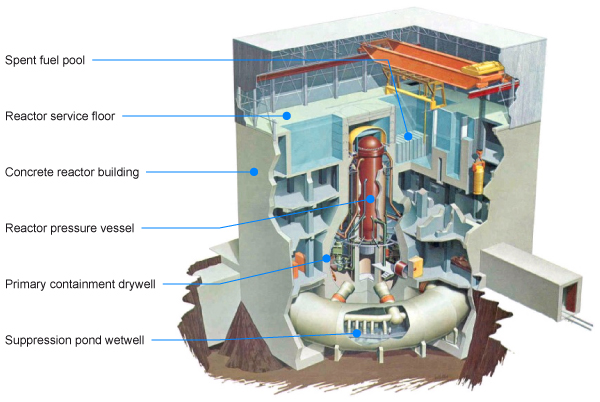
Fig.: Reactor design[3]
The Fukushima Daiichi reactors were GE boiling water reactors (BWRs) with a Mark I containment. Unit 1 had a capacity of 460 MW, units 2–5 had a capacity of 784 MW, and unit 6 had a capacity of 1100 MW.
The reactor cores would have been producing about 1.5 percent of their nominal thermal output from fission product decay when the power failed at 3:42 pm, nearly an hour after the fission processes were shut down - about 22 MW in unit 1 and 33 MW in units 2&3. This produced a lot of steam in the reactor pressure vessels (RPVs) housing the cores, which was released into the dry primary containment (PCV) through safety valves because there was no heat removal through circulation to an exterior heat exchanger. After the water level dropped, this was followed by hydrogen, which was evolved by the reaction of the fuel's extremely heated zirconium coating with steam.[3]
The steam was diverted into the suppression chamber/wet well under the reactor, within the containment, as pressure began to rise here, but the internal temperature and pressure continued to climb fast. Water injection began, with several systems and, finally, the emergency core cooling system being used (ECCS). These systems failed over three days, thus water injection to the RPV was done with fire pumps starting early Saturday, although the internal pressures had to be eased first by venting into the suppression chamber/wet well. The injection of seawater into unit 1 began at 7:00 p.m. on Saturday, December 12, and continued into unit 3 on Sunday, December 13, and unit 2 on Monday, December 14.
The water level in unit 1 dropped to the top of the fuel three hours after the scram and to the bottom of the fuel 1.5 hours later, according to reports. The exposed fuel's temperature soared to around 2800°C, causing the core part to melt within a few hours, and by 16 hours after the scram, the majority of it had fallen into the water at the RPV's bottom. Following that, the temperature of the RPV gradually reduced.
After hydrogen mixed with air and ignited, a hydrogen explosion occurred on the service floor of the building above unit 1 reactor containment at 3:36 p.m. on Saturday, blowing off the roof and cladding on the top part of the building and blowing off the roof and cladding on the top part of the building. (When zirconium cladding is oxidised at high temperatures in the presence of steam, hydrogen is produced exothermically, worsening the fuel decay heat problem.)[3]
The majority of the core – as corium, comprising of melted fuel and control rods – was thought to be in the bottom of the RPV in unit 1, but it eventually emerged that it had primarily eroded around 65 cm into the drywell concrete below (which is 2.6 m thick). This lowered the heat's intensity and allowed the bulk to solidify. Much of the gasoline in units 2&3 melted to some amount as well, though to a lower extent than in unit 1 and a day or two later. Unit 1 would have been producing 1.8 MW of heat in mid-May 2011, and units 2&3 roughly 3.0 MW apiece.
Much of the fuel in units 2&3 melted to some amount as well, though to a lower extent than in unit 1 and a day or two later. Unit 1 would have been producing 1.8 MW of heat in mid-May 2011, and units 2&3 roughly 3.0 MW apiece.
On Monday 14, the steam-driven backup water injection system in unit 2 failed, and it took nearly six hours for a fire pump to start feeding seawater into the RPV. The RPV pressure had to be alleviated via the wet well before the fire pump could be deployed, which required electricity and nitrogen, resulting in the delay. Meanwhile, after backup cooling was lost, the reactor water level dropped fast, causing core damage around 8 p.m. It is now known that much of the fuel melted and fell into the water at the bottom of the RPV roughly 100 hours after the scram. On Sunday 13 and Tuesday 15, pressure was released, and the blowout panel near the top of the building was opened to prevent a repeat of the hydrogen explosion at unit 1. The pressure suppression chamber beneath the real reactor seemed to breach early on Tuesday 15, probably as a result of a hydrogen explosion there, and the drywell containment pressure within fell. The rupture interpretation was not supported by a second inspection of the suppression chamber. On Tuesday 15, a leak of the primary containment was discovered, according to later investigation. Unit 2 appeared to be the source of the majority of the radioactive leaks from the site.[3]
In unit 3, the main backup water injection system failed around 11:00 a.m. on Saturday, December 12, and water injection using the high-pressure system failed early on Sunday, December 13, causing water levels to plummet. By venting steam into the wet-well, the RPV pressure was decreased, allowing seawater injection using a fire pump to begin shortly before midday. The suppression chamber and containment were successfully vented and contained early on Sunday.
An explosion occurred in defueled unit 4 around 6:00 a.m. on Tuesday, March 15th, destroying the top of the building and further damaging unit 3's superstructure. This was likely due to hydrogen originating in unit 3 and backflowing into unit 4 via shared ducts when unit 3 was evacuated.[3]
The tsunami caused the flooding of reactors resulting in failure in cooling systems and residual heat removal systems. This lead to rise in temperatures resulting in melting of the cores. The pressurized steam in the RPVs was also one of the causes. The hydrogen produced from the water zirconium reaction lead to detonation, which threw out radioactive materials into the atmosphere. A cold shutdown was announced after two weeks.
References:
[1] Sarit K. Das, Department of Mechanical engineering, Indian Institute of Technology, Madras, Heat and mass transfer issues associated with nuclear reactor safety.
[2] Preliminary lessons learned from Fukushima Daiichi accident for advanced nuclear plant development technology, https://www.iaea.org/topics/response/fukushima-daiichi-nuclear-accident
[3] Fukushima Daiichi Accident, https://world-nuclear.org/information-library/safety-and-security/safety-of-plants/fukushima-daiichi-accident.aspx
[4] https://static.javatpoint.com/gk/images/nuclear-power-plants-in-india4.jpg
[5] https://www.google.com/url?sa=i&url=https%3A%2F%2Fwww.sunnewsonline.com%2Fformer-utility-bosses-not-guilty-in-fukushima-disaster-court-rules%2F&psig=AOvVaw30RFwTjCkLSSlWUYY7kHG2&ust=1640508226339000&source=images&cd=vfe&ved=0CAsQjRxqFwoTCPiMqMnI_vQCFQAAAAAdAAAAABAY
Friday, May 28, 2021
C++ iostream class
INTRODUCTION
C++ uses the concept of streams and stream classes to
implement its I/O operations with the console and disk files. In C++
programming language, input/output library refers to a family
of class templates and supporting functions in the C++ Standard
Library that implement stream-based input/output capabilities. The I/O
stream in C++ is created to work with wide range of devices such as terminals,
disks and tape devices. Each device is very different therefore, I/O system
provides an interface that is independent of actual device being accessed. This
interface is known as streams. C++ IO is type safe. IO operations are defined
not only for a particular type but each type or else the compiler will generate
error.
What is <iostream>?
Iostream stands for standard input and output stream. C++
I/o streams are primarily defined by iostream, a header file which is a part of
C++ standard library. In C++ like C has no built-in syntax for streaming data
input and output, no keyword like read or write. Rather, these facilities are
provided by a library. Including <iostream> automatically includes
<ios>, <streambuf>, <istream>, <ostream> and
<iosfwd>. The header files include objects from <istream> and
<ostream> like cin, cout, cerr, clog etc.
- cin - This is the of standard input stream, usually keyboard.
- cout - This is of standard output stream, usually screen of the monitor.
- cerr - This is standard error output stream, usually screen of the monitor.
- clog - This is another version of cerr. It provides buffer to collect errors
STREAM CLASSES
C++ stream is a sequence of bytes, these bytes could
represent chars, raw data, graphics, digital speech, digital video or any other
information. I/O stream mechanism acts as a source to transfer bytes from input
stream to main memory and main memory to output stream. C++ consists of
hierarchy of classes called stream classes used for input and output operations
with console unit. All these classes are defined in iostream.h header file
figure below represents this hierarchy of classes.

Ios is the base class for istream and ostream, which are
base classes for iostream. ios_base provides support and defines all the basic
properties required for formatted and unformatted I/O operations. It is the
mother of the all base classes which contains most of the I/O code. Most of
this class comprises of components and functions for state and format flags.
istream(basic_istream<>) and ostream(basic_ostream<>) provides
input and output interfaces, derived virtually from basic_ios<> and defines
objects that can be used for reading and writing. iostream derives from both
istream and ostream and defines objects that can be used for both reading and
writing. streambuf provides and interface to physical devices through buffers.
IOSTREAM CLASS
The iostream class is derived from istream and ostream by
multiple inheritance and hence offers functionality of both classes. Class ios
is inherits indirect into iostream class using istream and ostream. ios class
is declared as a virtual base class while inheriting in istream and ostream to avoid
duplicity of data and member functions. This class is mainly declared in header
<istream>. It provides functionality to work with the objects, strings
and chars which includes inbuild functions such as get, getline, read, ignore,
putback, put, write etc.
The public member function, constructor present in iostream
behave exactly like constructor in istream class.
- Constructor: iostream::iostream() – when this is used without arguments, the constructor for iostream simply allocates a new ios object and the input counter is initialized to 0.
- Constructor: iostream::iostream(streambuf*sb[,ostream*tie]) – a constructor can also be called with one or two arguments. As we can see in the above syntax, the first argument sb is a streambuf i.e., if we supply this pointer, the constructor uses this streambuf for input and output. We can also use the optional second argument tie to specify a related output as the initial value for ios::tie.
Iostream simply uses the ios destructor, but an iostream is
deleted by its destructor.
The protected member functions present in iostream are:
- Operator ‘=’ – move assignment
- Swap – swap internals
UNFORMATTED I/O OPERATIONS
We know that the objects cin and cout which are predefined in the iostream file are used for input and output of various datatypes. This is mainly possible due to overloading of operators >> and << which are used to recognize all the basic C++ types. The operator >> is overloaded in istream and << is overloaded in ostream, and both these are included in iostream class. Let us look at the example below.
#include <iostream>
using namespace std;
int main(){
char output[] = "iostream.h";cout << output<< " - A header file that defines all the classes.";return 0;
}
OUTPUT
iostream.h
– A header file that defines all the classes.
In the program above, the cout statement is an instance of
ostream class, used to produce output which is displayed on standard output
device, like display screen. The data is inserted in cout using the insertion
operator (<<).
Look at the code below to understand cin statement which an instance of class iostream
#include <iostream>
using namespace std;
int main()
{
int x;
cout << "Enter a number:";
cin >> x;
cout << "\nNumber you chose is - " << x;
return 0;
}
The operator (>>) known as extraction operator is used
with object cin to read inputs. This operator extracts data from object entered
through input device, which is keyboard.
put() and get() FUNCTION
put() and get are member functions defined by the classes
ostream and istream respectively. Both are used to handle single character I/O
operations.
Get()
It is a member of istream class which is used to input a single character at a line. Two types of get() functions are present that are, get(char*) and get(void). These both prototypes can be used to get character, also including blank space, tab and newline character. In get(char*), the input character is assigned to its argument. Let’s look at the example given below.
#include <iostream>
using namespace std;
int main()
{
char x[15];cin.get(x, 15);while(x!= ‘/n’)
{
cout << x ;
}
return 0;
}
INPUT
Amazon forest
OUTPUT
The while loop present in the code above wouldn’t have
worked if cin >> x was used in place of cin.get(x). This is because the
cin extraction operator (>>) terminates when white space or newline
character is found.
get(void) is very simple to understand. It just assigns the
value returned by the function get() to the variable.
Example:
char c;
c = cin.get();
we can notice that cin.get(c) has been replaced by c =
cin.get();
put()
This function is a member of ostream class is used to output
a line of text, character by character. Check out the example below,
- cout.put(‘x’); - this statement displays the character x
- cout.put(ch); - this statement displays the value of variable ch which is assigned using an input device such as keyboard and it must contain a character value.
A number as an argument to the function can also be used.
Like,
- cout.put(68); - this statement converts the int value to a char value and will display a character whose ASCII value is the number mentioned. For this statement, it will display the character D.
the code below shows the working of put() function
#include <iostream>
using namespace std;
int main()
{
char char;
cin.get(char); // will scan a single char
cout.put(char); // will put a single char onto the screen.
}
INPUT
x
OUTPUT
x
getline() and write() functions
The reading and displaying of line of a text can be done
more efficiently using the line-oriented I/O functions getline() and write().
getline()
In C++ sometimes there is a need to enter multiple strings,
like a line or a paragraph. Using cin we cannot input multiple strings once. This
function can be used to read a whole line of text that ends with a newline
character which is transmitted using RETURN key. The syntax of this function
is:
cin.getline(line, size);
this is the older version which was used when strings
weren’t introduced. At that time the input as string was taken in the form of
array of characters.
Example:
char stng[1000]cin.getline(stng, 1000);
In the newer version when string was introduced, we can
input string directly as:
string sttnggetline(cin, sttng);
let us understand a bit more clearly through the code below
#include<iostream>
using namespace std;
int main()
{
string strin;cout<<"Enter the String "<<endl<<endl;getline(cin,strin);cout<<"You enterd : "<<endl;cout<<strin;return 0;
}
INPUT
Hey there, this is my first program.
OUTPUT
You entered:
Hey there, this is my first program.
Write()
This function is used to display an entire line, its syntax
is:
cout.write(line, size)
In the above statement, the first argument represents the name of string which is to be displayed whereas the second one, size indicates number of characters to display. Remember that, when a null character is present, it does nit stop displaying the characters. If size is greater than length, it displays beyond the line.
#include <iostream>
using namespace std;
int main()
{
cout.write("Acknowledgement", 5);
}
OUTPUT
Ackno
We can also concatenate using this function.
cout.write(string1, m). cout.write(string2, n);
The above statement is equivalent to
- cout.write(string1, m);
- cout.write(string2, n);
FORMATTED I/O OPERATIONS
There are number of features supported by C++ that are used for formatting the output. These are:
- ios class functions and flags
This class contains huge number of member functions that
help in formatting the output in various ways. Some of them are:
- precision():used to set the number of the decimal point to a float value
- fill(): used to set a character to fill in the blank space of a field
- setf(): used to set various flags for formatting output
- unsetf(): used To remove the flag set
This class contains format flags that control the way of
formatting i.e., using the setf function, with this we can set flags that allow
us to display a value in some particular format. The bitmask enumeration called
fmtflags defines all the values like showbase, showpoint etc. this is declared
in ios class.
- C++ manipulators.
Manipulators are special helping functions that can be included to modify or alter the format parameters of the stream. It doesn’t mean that we are changing the value of a variable it means simply modifying it using ‘<<’ and ‘>>’ operators.
Important manipulators are:
- endl – it is used to enter a newline and flushes after entering the new line. It is defined in ostream.
- ws – used to ignore whitespaces present in string sequence. Defined in istream.
- ends – it inserts a null character into output stream. It is used when associated output buffer requires to be null- terminated to be processed as a c string.
- flush – defined in ostream, flushes the output stream which means it flushes all the output on the screen or file. If we don’t use it, the output will be same it just may not appear in real-time.
Other public member functions inherited from istream
- gcount - To get character count
- ignore – To extract and discard characters
- peek- To peek next character
- read – To read block of data
- tellp - Get position in output sequence
- seekp - Set position in output sequence
Books -
Object oriented programming with C++ by E Balaguruswamy
Wednesday, May 26, 2021
Boundary Layer Theory
Boundary Layer Theory
 [1]
[1]
Development of Boundary Layer theory was an important event in the development of fluid mechanics. It was a significant step to numerous technological marvels such as passenger jets, fast submarine, etc.
For understanding the boundary layer theory we must first understand what boundary layer is.
Boundary Layer
Consider a section of length L of an infinite plate. A flowing stream with an initial maximum velocity Ue flows over the plate. Its flow velocity is zero at the point of contact with the plate/wall and varies to Ue till a certain distance δ from the plate. From 0 to L, the δ increases.
Beyond δ, the velocity of stream remains Ue. The locus of all these points (at a distance δ) Is called the boundary layer edge and the area below it is the Boundary Layer.
Strictly speaking, the value of δ is an arbitrary value because the friction force, depending on the molecular interaction between fluid and the solid body, decreases with the distance from the wall and becomes equal to zero at infinity.
In simple terms, the effects of friction on the stream due to the plate are not observed significantly beyond the boundary layer edge and the fluid flow is essentially free of viscosity.

Figure 1. Growth of a boundary layer on a flat plate.
It was L. Prandtl (1904) who proposed the fundamental concept of boundary layer which defines the boundary layer as a layer of fluid developing in flows with very high Reynold's number Re, that is with relatively low viscosity as compared with inertia forces. When bodies are exposed to a stream of air of high velocity or when bodies are very large compared to the air stream to which they are exposed. In this case, in a relatively thin boundary layer, friction shear stress (viscous shearing force): τ = η[∂u/∂y] (where η is the dynamic viscosity; u = u(y) – “profile” of the boundary layer longitudinal velocity component, Fig 1) may be very large; in particular, at the wall where u = 0 and τw = η[∂u/∂y]w although the viscosity itself may be rather small.
The frictional forces are negligible and can be ignored outside the boundary layer(as compared with inertia forces), and on the basis of Prandtl’s concept, to consider two flow regions: the boundary layer where friction effects are large and the almost inviscid flow core. Making an assumption that boundary layer is very thin as compared to the length of the section i.e. δ << L, where L is the characteristic linear dimension of the section of body over which the flow occurs or the channel containing the flow, its thickness decreasing with growth of Re, fig.1), it is possible to estimate the one can estimate the order of magnitude of the boundary layer thickness from the following relationship:

Let’s understand this with an example. Consider an aeroplane which is flying at Ue = 400 km/hr, the boundary layer thickness at the wing trailing edge with one meter chord (profile length) is δ=0.015 m. According to experimentally established data, a laminar boundary layer is developed over the inlet section of the body. Gradually under some destabilizing factors, the boundary layer becomes unstable and transition of boundary layer to Turbulent Flow regime takes place. Experimental results have concluded the existence of a transition region between the turbulent and laminar regions. Sometimes, such as in case of high turbulence level of the external flow, the boundary layer becomes turbulent immediately downstream of the stagnation point of the flow. In case of some conditions, such as a severe pressure drop, an inverse phenomenon takes place in accelerating turbulent flows, namely flow relaminarization.

Fig. 3: Laminar and turbulent flow over a wing [2]
In spite of its relative thinness, the boundary layer is very significant for initiating processes of dynamic interaction between the floe and body. The boundary layer determines the aerodynamic drag and lift of the flying vehicle, or the energy loss for fluid flow in channels. In this case, a hydrodynamic boundary layer because there is also a thermal boundary layer which determines the thermodynamic interaction of heat transfer.
Computation of the boundary layer parameters is based on the solution of equations obtained from the Navier–Stokes equations for viscous fluid motion, which are first considerably simplified considering the thinness of the boundary layer. This can be considered to be the most significant role of the boundary layer theory.
Foundation of Boundary layer theory
The development of boundary layer theory was initiated by Ludwig Prandtl, presenting paper On the motion of a fluid with very small viscosity at the Third International Congress of Mathematics in August, 1904, at Heidelberg and published in the Proceedings of the Congress in the following year.
The equations of motion of a viscous fluid were established in the first half of the last century by Navier (1823), Poisson (1831), Saint-Venant (1843), and Stokes (1845), having attained the form that is now called the Navier-Stokes equations. Stokes used the equations to consider the small oscillations of a sphere in a viscous fluid by assuming that there is no slip, that is, no relative tangential velocity, at the surface of the sphere. The solutions obtained by Stokes, were confined to special cases, where it was possible to solve the Navier Stokes equations. To make the calculations easier, approximation to neglect viscosity was introduced but this lead to d'Alembert paradox, according to which a solid body of any shape placed in a uniform stream experiences no resistance.
Difficulties faced in the mathematical integration of equations of a viscous fluid made neglecting the nonlinear terms of the equation unavoidable. This approximation, justified only for slow motions, was made unavoidably also for faster motions, but with the optimistic hope that these solutions might give a better representation of the flow than those obtained by neglecting the viscosity. It was almost universally agreed that there is no slip at the solid wall in the case of slow motions. But in case of fast motion, there was division of views.
Pradtl’s paper
Pradtl recognized in his paper that the most important question concerning flow of fluid of small viscosity is the behaviour of the fluid at the wall of the solid boundary. He concluded that the the effects of viscosity are significant only within a thin transition layer, which is called the boundary layer. Beyond the boundary layer, the flow can be considered free of viscosity and is described by an irrotational motion to a high degree of accuracy. The small thickness of the boundary layer allows us to make certain approximations in the equations applicable for the region within the boundary layer, the variation of pressure normal to the wall is negligibly small, and the variation of velocity along the wall is much smaller than its variation normal to it. In case of two dimensional flow, since the effect moderate curvature of wall is insignificant due to it’s small value, x and y can be considered as the distances along and normal to the wall while u and v being the corresponding velocity components. the component of Navier Stokes equation is then simplified to

Where, t = time,
p = pressure,
ρ = density,
v = kinematical viscosity
Prandtl considered the solution of the equation for the simple case p = constant, that is, the case of a semi-infinite thin flat plate placed parallel to a stream of uniform velocity U, and obtained a rough estimate 1.1pvt/2[t/2U3/2 for the frictional resistance exerted on the two sides of unit width of a plate of length /. This was the first theoretical analysis of the frictional resistance, although the numerical coefficient 1.1 was later corrected by Blasius (1908) to 1.33.

Ludwig Pradtl at his water tunnel [3]
A remarkable consequence of the investigation from the standpoint of application was, according to Prandtl, that "in certain cases, the flow separates from the surface at a point entirely determined by external conditions. A fluid layer, which is set in rotation by the friction on the wall, is thus forced into the free fluid and, in accomplishing a complete transformation of the flow, plays the same role as the Helmholtz separation layers.
This was the early foundational work on Boundary layer Theory
Applications
- Mathematically, application of the boundary - layer theory converts the character of governing Navier-Stroke equations from elliptic to parabolic
- This allows the marching in flow direction, as the solution at any location is independent of the conditions farther downstream.
- The parameters that describe the flow within the boundary layer are important in many areas such as:
- Wing stall
- The skin friction drag on an object
- The heat transfer that occurs in high speed flight.
Limitations of Boundary Layer theory
The concept of boundary layer is important for understanding fluid flows with higher values of Reynold’s number (Re>>1). But in the use of boundary layer as a quantitative asymptotic theory, we face severe limitations in the concepts of turbulence and boundary layer separation.
We can apply boundary layer theory when value of Reynold’s no. approaches infinity. But in this limit, boundary layer flows are turbulent. Turbulent flows have a complex and random fine structure and their length scales are dependent on Re. When Reynold’s no. is of the order 106, the boundary layer becomes turbulent. The phenomenon where the boundary layer exits the boundary and enters the interior of the fluid is called boundary layer separation. In such cases, a strong coupling between the outer flow and the boundary layer comes into picture which is accompanied by turbulence. A systematic mathematical theory for turbulent flows is still undeveloped.
References:
1. https://www.thermopedia.com/content/595/
2. Itiro Tani, History of boundary layer theory, National Aerospace Laboratory, 1880 Jindaiji, Chofu, Tokyo, Japan
3. https://www.grc.nasa.gov/www/k-12/airplane/boundlay.html
4. https://nptel.ac.in/content/storage2/courses/112104118/lecture-28/28-4_boundary_layer_condn.htm
5. https://www.math.ucdavis.edu/~hunter/m204/boundary.pdf
Image sources:
1. https://www.sciencephoto.com/media/353466/view/typhoon-fighter-plane-aerodynamics
2. http://www.pilotfriend.com/training/flight_training/aero/boundary.htm
3. https://www.researchgate.net/profile/Michael-Eckert-5/publication/51918331/figure/fig1/AS:655137915826178@1533208459251/Ludwig-Prandtl-at-his-water-tunnel-in-the-mid-to-late-1930s-Reproduction-from-the.png
Subscribe to:
Comments (Atom)

-
 Nuclear energy is one of the cleanest forms of energy and a blessing for humankind if handled well. But it poses a great threat to the en...
 -
Boundary Layer Theory [1] Development of Boundary Layer theory was an important event in the development of fluid mechanics. It was a ...

